
Docs / AmbiBack Web Flasher
AmbiBack Web Flasher
The AmbiBack Web Flasher installs the AmbiBack firmware on an ESP32 over USB, right in the browser. No Arduino IDE, no esptool and no Windows program needed.
Status: new project of 25 November 2026, free software under the GPL 3. Flashing, monitor and Wi-Fi setup have not yet been tested with real hardware. There is no product support.
Open the Web FlasherSource code
What you need
- Chrome, Edge or Opera on a desktop computer (Windows, macOS, Linux or ChromeOS). Firefox, Safari and phones or tablets cannot access USB serial ports from a web page.
- A USB data cable; many cables only charge.
- On Windows the USB driver of your board: Silicon Labs CP210x or WCH CH340/CH9102. macOS and Linux usually have them built in.
Install the firmware
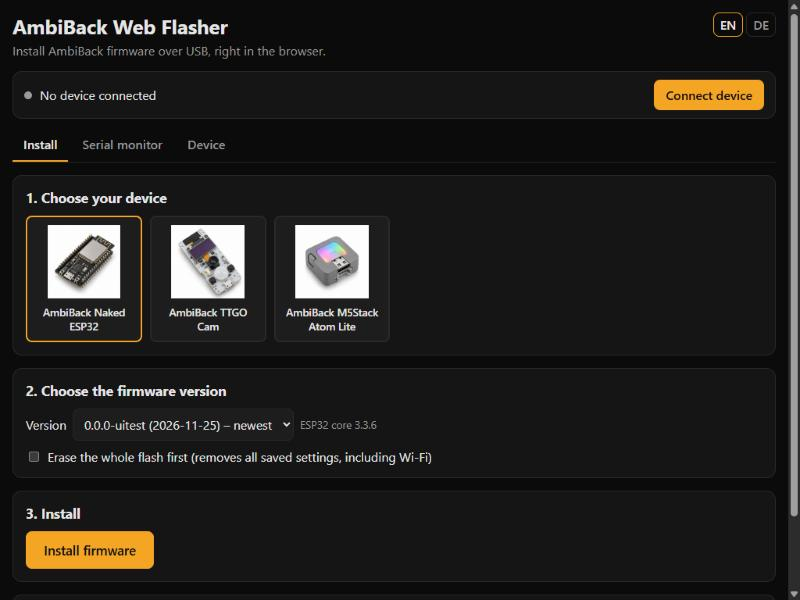
- Plug the ESP32 into the computer.
- Open the Web Flasher and pick your device from the pictures.
- Keep the newest version, or pick an older one.
- Press Install firmware and choose the USB port in the browser's list.
- Wait until the progress bar is full. The device restarts.
- Enter your Wi-Fi name and password and press Connect. The page shows the address of the device when it is online.
Tick Erase the whole flash first only if the device behaves strangely after an update; it removes all saved settings, including Wi-Fi. Everything runs in your browser: the Wi-Fi password goes straight to the device over USB and is not sent anywhere else.
Serial monitor and device
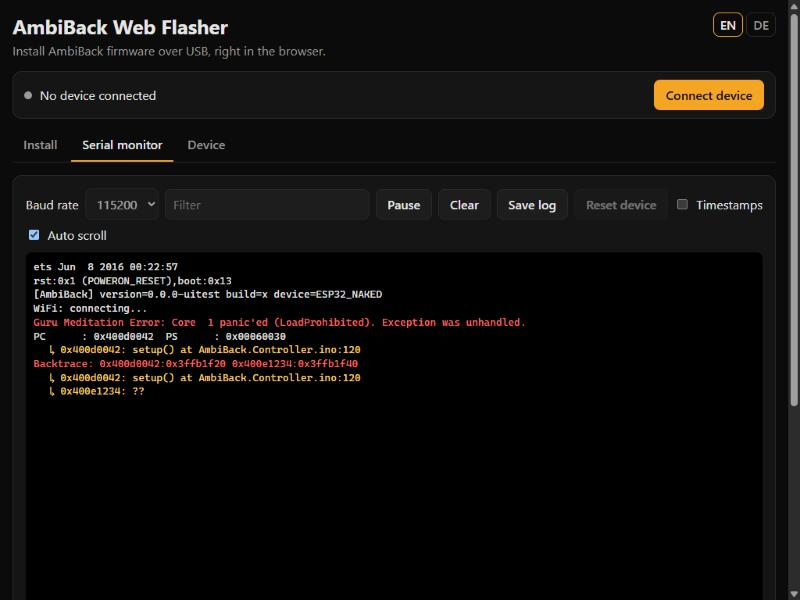
The Serial monitor tab shows what the device prints, with filter, pause, timestamps and saving the log as a text file. When the device crashes, each backtrace address shows its function and source line: the firmware prints its version at boot, and the monitor loads the matching symbol map.
The Device tab shows device info, runs LED test, reboot, hardware reset and factory defaults (asks first), reads the Improv device info and sets new Wi-Fi details at any time.
How it works
- GitHub Actions in ambiback-firmware builds the firmware for all 13 device types. The Web Flasher takes the newest releases and checks every file against its SHA-256 before flashing.
- Flashing uses esptool-js over Web Serial. Wi-Fi is set up through Improv Wi-Fi Serial, older firmware without Improv gets the AmbiBack
%WIFI:command. - If flashing stops, it retries at lower speeds by itself.
To build your own firmware with your own options, use the Windows AmbiBack USB Flasher.
Problems
| The port list is empty | Try another cable and USB port; on Windows install the CP210x or CH340 driver. Close programs that use the port: Arduino IDE, AmbiBack USB Flasher, serial terminals. |
|---|---|
| The ESP32 does not answer | Some camera boards have no automatic boot mode: hold BOOT (IO0), press and release RESET (EN), release BOOT, then start again. |
| Wi-Fi does not connect | Check name and password (case matters). The ESP32 only supports 2.4 GHz networks. |
More in the README on GitHub.